
How to Arm and Disarm Your IQ Panel
Follow these steps to arm and disarm your security system using your IQ Panel. The images show the IQ5 Hub interface.
Arming
1. Open the arming options
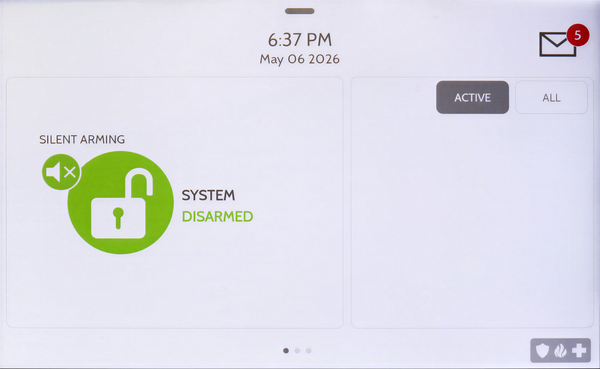
Tap the green unlocked padlock on the home screen.
2. Select an arming mode
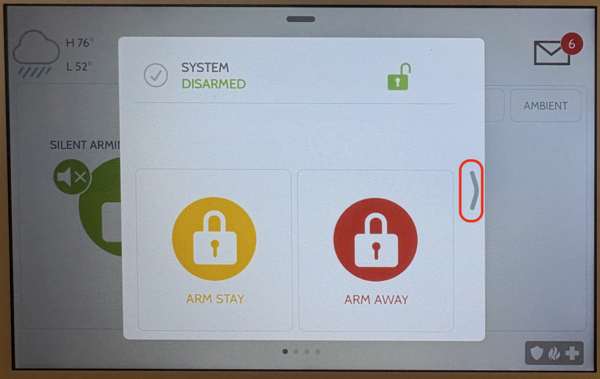
Choose the appropriate mode for your property.
Arm Stay
Choose the yellow lock when remaining inside. Typically protects perimeter sensors while allowing movement indoors.
Arm Away
Choose the red lock when leaving. Typically protects perimeter and interior intrusion sensors.
3. Allow the system to arm
When using Arm Away, leave through your designated exit door and close it before the countdown expires. Entry and exit delays and sensor coverage vary by system configuration.
Disarming
1. Enter your personal user code
When entering through a designated entry-delay door, enter your code before the countdown expires. If the keypad is not displayed, tap the armed status icon to open it.
2. Confirm your system is disarmed
Check that the panel returns to its green System Disarmed status.
Helpful tip: Give each authorized user their own access code. See How to Add or Change User Codes on Your IQ Panel.