
How to Bypass Zones on Your IQ Panel
A zone may need to be temporarily bypassed if a door or window is open or a sensor is malfunctioning.
Bypassing a Zone
1. Open the arming options
With the system disarmed, tap the green unlocked padlock.
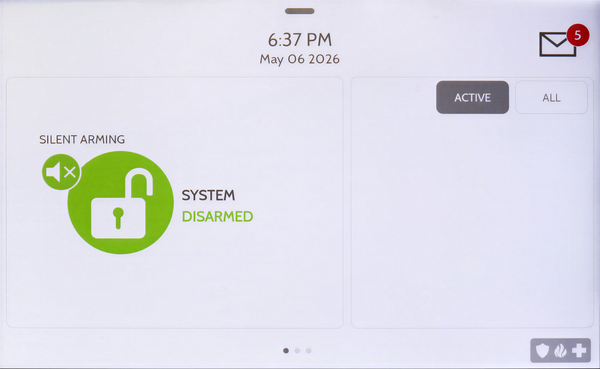
2. Expand the arming menu
Tap the arrow on the right side of the arming window.
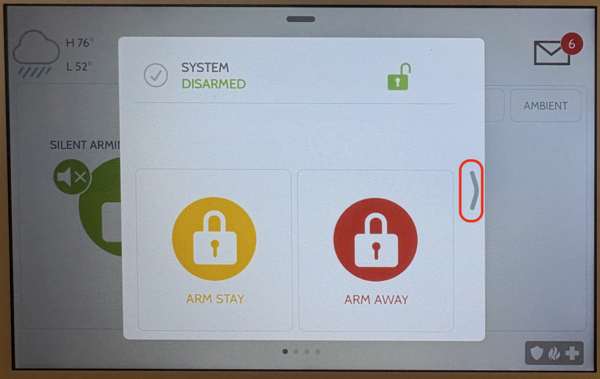
3. Review the available zones
The Active tab shows open or faulted zones. The All tab shows the full sensor list.
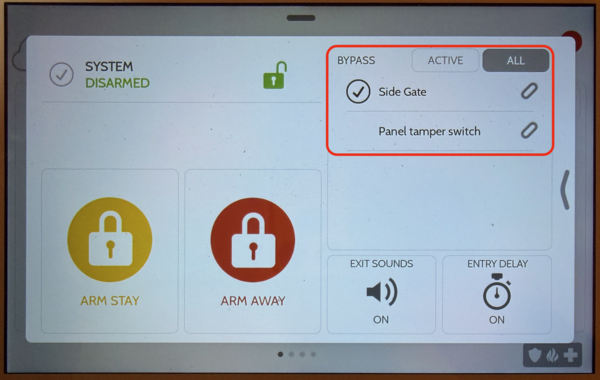
4. Select the zone to bypass
Select only the intended zone using the circle beside its name. Review your selection before arming.
5. Arm the system
Choose Arm Stay or Arm Away as appropriate. Confirm the system’s status and the bypass indication.
Important
A bypassed intrusion sensor will not provide its normal protection while excluded. Restore normal protection as soon as possible. Bypassing typically applies to the current arming cycle; check your panel’s status each time you arm.